What you get
These are real screens from the app, filled in with demo data.
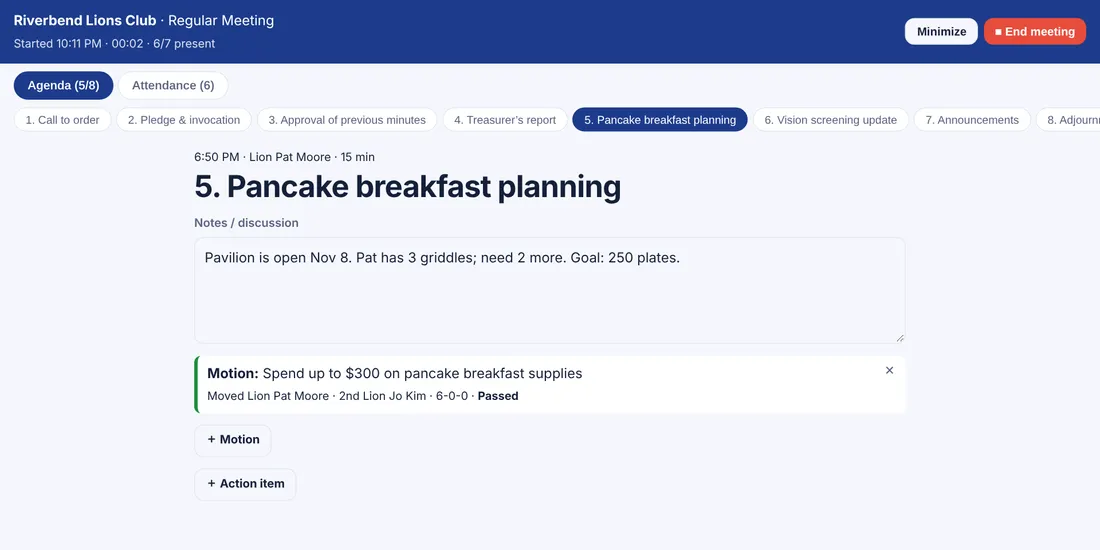
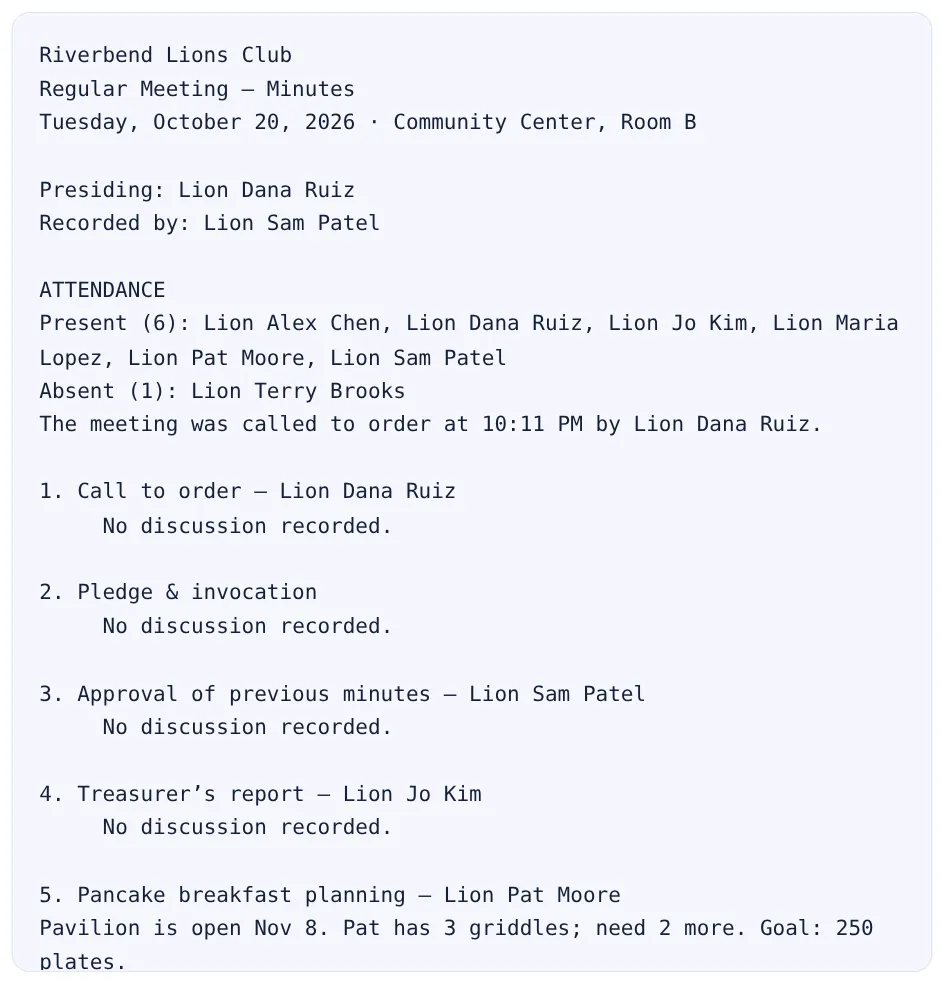
Run your meeting from your phone: tap through the agenda, log motions and attendance as they happen, assign action items. Tap “End meeting” and clean, ready-to-send minutes are waiting. No retyping that night.
The kit is free with no sign-up, and so is the live demo of a sample club. Club accounts: 30-day free trial, no card.
4. Pancake breakfast planning — Pavilion booked for Nov 8. Goal: 250 plates.
MOTION: Spend up to $300 on supplies. Moved Lion Pat, seconded Lion Jo. 6–0–0. Passed.
ACTION: Lion Pat — borrow 2 griddles (due Nov 1)
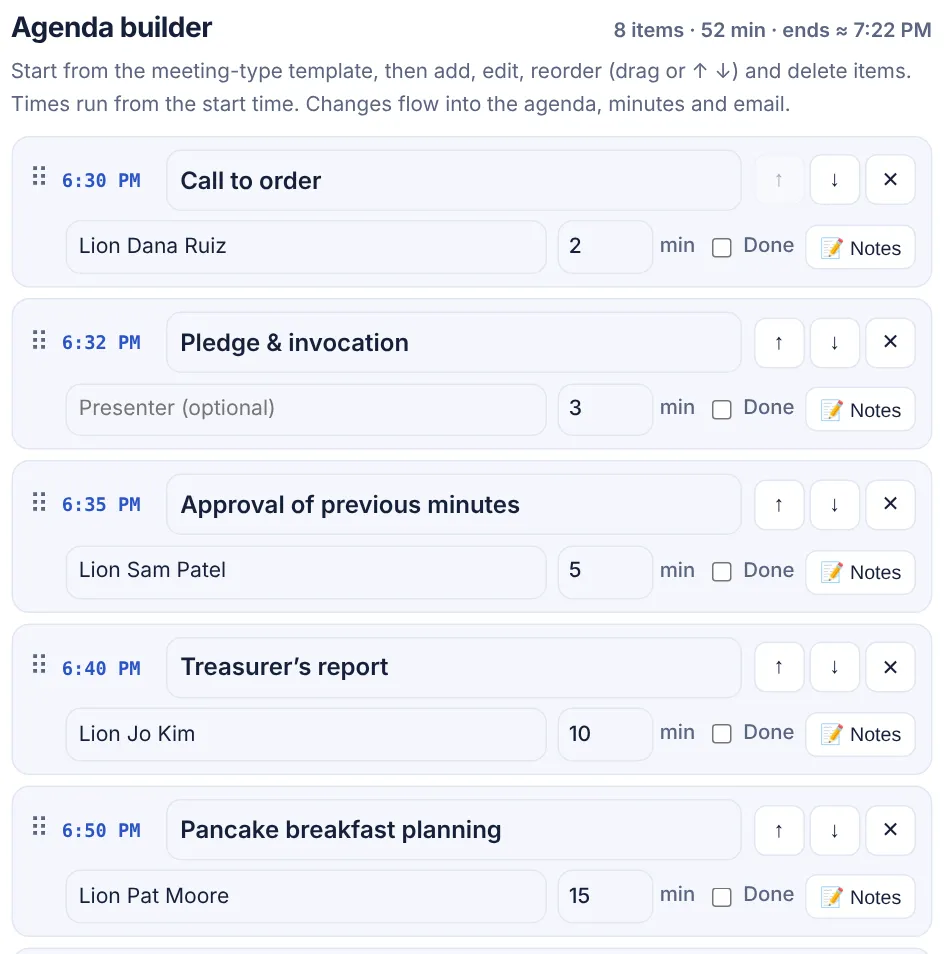
Build the agenda: templates, drag to reorder, times calculated.
From agenda to finished minutes without retyping anything.
Club name, officers and usual meeting spot autofill every time.
Start from a template, add items, drag to reorder. Unfinished items and open actions carry over.
Tap through the agenda, log motions and attendance, then “End meeting” — minutes are done.
Keep using Drive for storage if you like — just stop rebuilding minutes by hand.
| Google Docs template | Club Meeting Kit | |
|---|---|---|
| Minutes | Typed up after the meeting | Finished the moment you tap “End meeting” |
| Motions & votes | Scribbled, often incomplete | One tap: moved, seconded, for / against / abstain, passed or failed |
| Attendance & quorum | Manual list | Tap-to-check roster with quorum count |
| Action items | Lost in last month’s doc | Owner + due date, roll into the next agenda until done |
| Agenda | Copy, paste, fix times | Drag-and-drop builder with running times and carry-over |
| Finding past decisions | Open docs one by one | Search every motion, decision and action item |
| Officer handoff | “Who has the folder?” | Club backup or shared club account; export to Word / Google Docs anytime |
The same meeting, written up two ways.
MINUTES - Sept Oct ??
present: dana, jo, pat, maria?? (check w/ sam)
treas - $2,140?? ask jo
pancake bfast - pat said nov 8?? motion to spend $$ on supplies - who 2nd?? passed i think
TODO someone get griddles
[old agenda from June pasted below]
Regular Meeting — Minutes
Tuesday, October 20 · Community Center
Present (6): Alex Chen, Dana Ruiz, Jo Kim, Maria Lopez, Pat Moore, Sam Patel · Absent (1)
Treasurer’s report — Lion Jo Kim: balance $2,140.
Pancake breakfast — Pavilion booked Nov 8.
MOTION: Spend up to $300 on supplies. Moved Lion Pat Moore, seconded Lion Jo Kim. 6–0–0. Passed.
ACTION: Lion Pat Moore — borrow 2 griddles (due Nov 1)
These are real screens from the app, filled in with demo data.
Simple tools for the jobs that come around every month.
Edit, reorder and time every agenda item; minutes follow with a section and motion lines for each.
Walk the agenda, take a note per item, log motions and attendance — minutes write themselves.
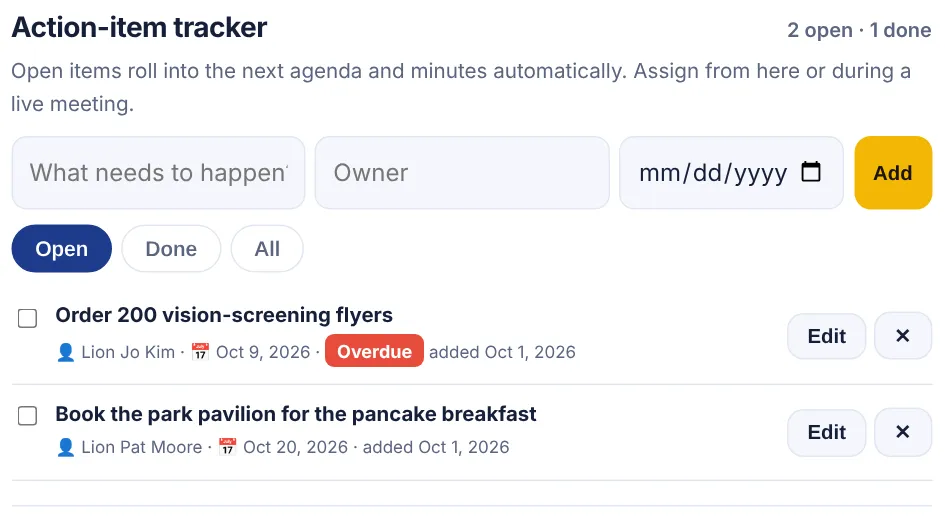
Assign an owner and due date; open items roll into the next agenda until they’re done.
Turn volunteers, hours, people served and funds raised into a summary ready for MyLion, Rotary Club Central or your newsletter.
See every meeting date for the year and export them to your calendar (.ics).
Find any past motion or decision in seconds. Export to Word or Google Docs; hand the club to the next secretary.
Everything stays in your browser — private by default.
Start from the meeting-type template, then add, edit, reorder (drag or ↑ ↓) and delete items. Times run from the start time. Changes flow into the agenda, minutes and email.
Starts from the date and time in Meeting details. Shows the next 12 months.
🕘 History is saved only in this browser. Export a backup to hand off to the next secretary, keep it in your club’s shared drive, or move to another computer.
Upload your logo, pick your club color and add a motto. They appear on agendas, minutes, flyers, reminder emails, print/PDF and Word files, so everything you send looks official.
Start 30-day free trialService above self
“I’m Mark Shellard, a member of the Seguin Sunrise Lions Club and Technology Chair for Lions District 2-S5. I watched secretaries rebuild the same Google Doc every month and type up minutes from scribbled notes late at night. I built Club Meeting Kit so the minutes are done by the time the meeting is over. Tell me what your club needs. I read every message.”
Mark Shellard · Seguin Sunrise Lions · District 2-S5 Technology Chair · Send feedback
Free forever for the basics.
$0
$5/month or $50/year Save $10
Start with a free 30-day trial — no card, no charge. Paid plans are coming soon; we’ll email you before anything changes.
Yes. Everything runs in your browser for free. Club accounts are open now with a free 30-day trial, no card needed. They add shared cloud history, officer accounts and invites, the club dashboard and easy handoff at officer turnover. Paid plans ($5/month or $50/year per club) are coming soon, and we’ll email you before anything changes. Your club keeps access if the trial ends before then.
No. It's an independent tool built by a Lions member and is not affiliated with or endorsed by Lions Clubs International.
The free kit keeps everything in your own browser (localStorage), and nothing is sent to a server. Clearing your browser data removes it. If you create a club account, your club’s data is stored in our cloud database and shared only with your club’s members.
Regular, board, installation of officers, service project kickoff, committee, fundraiser planning, new member orientation, and annual/elections meetings.
Yes. Enter volunteers, hours, people served and funds raised and it writes a summary you can paste into MyLion or your club newsletter.
Yes. Choose your meeting pattern to see a year at a glance and download an .ics file for Google, Outlook or Apple Calendar.
Without a club account, history is saved only in your browser. Open History and press “Export club backup” to download a file with your club profile, saved documents and calendar settings. Keep it in your club’s shared drive; the next secretary uses “Import backup” to restore it (merges without duplicates, or replace).
Yes. Each meeting type starts with a template you can edit: add items (or tap quick-add chips like guest speaker, treasurer’s report or 50/50 drawing), set a presenter and minutes for each, reorder by dragging or with ↑ ↓, carry over unfinished items from last meeting, and save your version as the club default. Items flow into the minutes, reminder email and Word export.
Press “Start live meeting” and walk the agenda item by item on a phone, tablet or laptop. Take a quick note per item, log motions in one tap (moved by, seconded by, votes for/against/abstain, passed or failed), check off attendance from your member list and assign action items. Press “End meeting” and finished minutes are generated instantly and saved to history.
Assign an owner and due date to any action item, from the tracker or during a live meeting. Open items appear automatically on the next agenda and in the minutes until someone marks them done; overdue items are flagged.
Yes. Search across saved meetings and the action tracker for motions, decisions (passed motions), notes and action items, and open the meeting with one tap.
A template still needs someone to type up minutes after the meeting and to chase motions and action items. Club Meeting Kit records motions, attendance and action items during the meeting, produces finished minutes when it ends, carries open items forward and makes everything searchable. You can still export to Word or Google Docs.
Yes. “Open in Google Docs” downloads a Google Docs-ready .docx and opens Google Drive. Upload it, then choose File → Save as Google Docs (or turn on Drive’s “Convert uploads” setting).
Signed-in club members get an app dashboard instead of the landing page: the next meeting with Build agenda and Start live meeting buttons, open action items (overdue first), recent minutes, quick stats and plan status, with a sidebar (bottom tabs on phones) for the agenda builder, live meeting, history, action items, search, members, calendar, service reports and settings.
Yes. In the agenda builder, Save draft stores the agenda under a name, tied to its meeting date and type. When you start a live meeting, a picker suggests today’s or the next meeting’s draft, lists your saved drafts (newest first, with date, item count and last edited), club default templates for each meeting type, or a blank agenda, and previews the items before you start. If a meeting is already in progress you can resume it.
Yes. Pick your club type (Lions, Rotary, Kiwanis, Optimist, PTA/PTO/booster, HOA, nonprofit board or other) and the kit switches its wording, default agendas for each meeting type, quick-add agenda items (e.g. Tail Twister for Lions, Four-Way Test and sergeant-at-arms for Rotary, principal’s report for PTAs, homeowner forum for HOAs, consent agenda for nonprofit boards), the service-report target (MyLion, Rotary Club Central or a general summary) and the default officer turnover date, which you can change.
Click Sign in or Start free trial and enter your email. We send a one-time sign-in link, so there’s no password. With an account we store your email and the club data you save, shared only with your club’s members. We never sell data. See the Privacy Policy and Terms linked in the footer.
Yes. Download a real Word .docx file (opens in Word, Google Docs and LibreOffice), or use Print and choose "Save as PDF".
Found a bug or have an idea? Tell us. Mark reads every message.
Try the kit free right now, or start a 30-day free club trial. No card needed.